> ## Documentation Index
> Fetch the complete documentation index at: https://help.mytruv.com/llms.txt
> Use this file to discover all available pages before exploring further.

# MCP for AI Agents

> Give your coding agent access to MyTruv financial data via the Model Context Protocol.

## What is MCP for AI Agents?

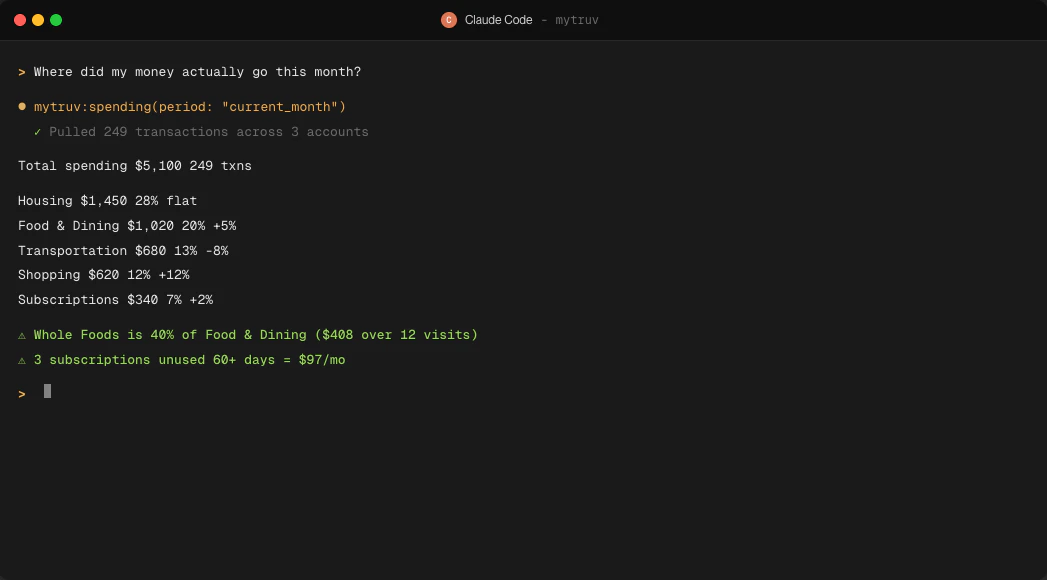
The same hosted MCP server that powers chat apps also exposes your MyTruv data to agentic developer tools - Claude Code, Codex, Cursor, and any other client that speaks MCP. Drop the URL into the agent's config and it can call read-only tools to inspect your accounts, transactions, spending, and income while reasoning over your code or workflows.

<Frame>
  <img src="https://mintcdn.com/mytruv-docs/2XJQJIAqGSpjl26O/images/product/mcp/claude-code-session.png?fit=max&auto=format&n=2XJQJIAqGSpjl26O&q=85&s=db021cad3ee32e87b7a8bd08101fd4f1" alt="Claude Code session calling mytruv:spending and rendering a categorized monthly breakdown in the terminal" width="1047" height="580" data-path="images/product/mcp/claude-code-session.png" />
</Frame>

<Info>
  The MCP server is read-only. It cannot modify your accounts, create transactions, or change any settings.
</Info>

***

## Prerequisites

* A MyTruv Pro subscription (monthly or annual) with at least one connected bank or payroll account
* A coding agent or terminal client that supports MCP servers over OAuth

<Warning>
  MyTruv MCP is only available on the Pro plan. [Upgrade to Pro](/billing/subscription-plans) to get started.
</Warning>

***

## How authentication works

OAuth - no API keys or tokens to manage. The first time the agent calls a MyTruv tool, your browser opens so you can authorize access. The session stays active until you sign out.

The server URL is:

```
https://api.mytruv.com/mcp
```

***

## Pick your agent

<div className="mytruv-card-grid">
  <a className="mytruv-card" href="/mytruv-mcp/setup/claude-code">
    <span className="mytruv-card__icon">
      <svg viewBox="0 0 24 24" fill="none" stroke="currentColor" strokeWidth="1.75" strokeLinecap="round" strokeLinejoin="round">
        <path d="M4 17l6-6-6-6" />

        <path d="M12 19h8" />
      </svg>
    </span>

    <h3 className="mytruv-card__title">Claude Code</h3>
    <p className="mytruv-card__body">One-command install in the Claude Code CLI</p>

    <span className="mytruv-card__arrow">
      <svg width="16" height="16" viewBox="0 0 24 24" fill="none" stroke="currentColor" strokeWidth="2" strokeLinecap="round" strokeLinejoin="round">
        <path d="M7 17L17 7" />

        <path d="M8 7h9v9" />
      </svg>
    </span>
  </a>

  <a className="mytruv-card" href="/mytruv-mcp/setup/codex">
    <span className="mytruv-card__icon">
      <svg viewBox="0 0 24 24" fill="none" stroke="currentColor" strokeWidth="1.75" strokeLinecap="round" strokeLinejoin="round">
        <path d="M16 18l6-6-6-6" />

        <path d="M8 6l-6 6 6 6" />
      </svg>
    </span>

    <h3 className="mytruv-card__title">Codex</h3>
    <p className="mytruv-card__body">OpenAI Codex CLI via CLI or config.toml</p>

    <span className="mytruv-card__arrow">
      <svg width="16" height="16" viewBox="0 0 24 24" fill="none" stroke="currentColor" strokeWidth="2" strokeLinecap="round" strokeLinejoin="round">
        <path d="M7 17L17 7" />

        <path d="M8 7h9v9" />
      </svg>
    </span>
  </a>

  <a className="mytruv-card" href="/mytruv-mcp/setup/cursor">
    <span className="mytruv-card__icon">
      <img src="https://mintcdn.com/mytruv-docs/2XJQJIAqGSpjl26O/images/logos/cursor.svg?fit=max&auto=format&n=2XJQJIAqGSpjl26O&q=85&s=359b26f281376446257b28a5685f908f" alt="" width="16" height="16" data-path="images/logos/cursor.svg" />
    </span>

    <h3 className="mytruv-card__title">Cursor</h3>
    <p className="mytruv-card__body">Cursor Settings UI or mcp.json</p>

    <span className="mytruv-card__arrow">
      <svg width="16" height="16" viewBox="0 0 24 24" fill="none" stroke="currentColor" strokeWidth="2" strokeLinecap="round" strokeLinejoin="round">
        <path d="M7 17L17 7" />

        <path d="M8 7h9v9" />
      </svg>
    </span>
  </a>

  <a className="mytruv-card" href="/mytruv-mcp/setup/other">
    <span className="mytruv-card__icon">
      <svg viewBox="0 0 24 24" fill="none" stroke="currentColor" strokeWidth="1.75" strokeLinecap="round" strokeLinejoin="round">
        <path d="M9 2v6" />

        <path d="M15 2v6" />

        <path d="M6 8h12v4a6 6 0 0 1-12 0z" />

        <path d="M12 18v4" />
      </svg>
    </span>

    <h3 className="mytruv-card__title">Other clients</h3>
    <p className="mytruv-card__body">Gemini CLI, VS Code, JetBrains, Windsurf, Zed, and more</p>

    <span className="mytruv-card__arrow">
      <svg width="16" height="16" viewBox="0 0 24 24" fill="none" stroke="currentColor" strokeWidth="2" strokeLinecap="round" strokeLinejoin="round">
        <path d="M7 17L17 7" />

        <path d="M8 7h9v9" />
      </svg>
    </span>
  </a>
</div>

Using Claude.ai or ChatGPT? See [MCP for AI Chats](/mytruv-mcp/overview).

***

## Try it out

After connecting, ask the agent to query something concrete - for example, "summarize my last month of spending" or "list my recurring subscriptions over \$20". The agent will call MyTruv tools under the hood and return the answer with the data it pulled.

<div className="mytruv-card-grid">
  <a className="mytruv-card" href="/mytruv-mcp/tools">
    <span className="mytruv-card__icon">
      <svg viewBox="0 0 24 24" fill="none" stroke="currentColor" strokeWidth="1.75" strokeLinecap="round" strokeLinejoin="round">
        <path d="M14.7 6.3a1 1 0 000 1.4l1.6 1.6a1 1 0 001.4 0l3.77-3.77a6 6 0 01-7.94 7.94l-6.91 6.91a2.12 2.12 0 01-3-3l6.91-6.91a6 6 0 017.94-7.94l-3.76 3.76z" />
      </svg>
    </span>

    <h3 className="mytruv-card__title">Available tools</h3>
    <p className="mytruv-card__body">The full set of read-only tools your agent can call.</p>

    <span className="mytruv-card__arrow">
      <svg width="16" height="16" viewBox="0 0 24 24" fill="none" stroke="currentColor" strokeWidth="2" strokeLinecap="round" strokeLinejoin="round">
        <path d="M7 17L17 7" />

        <path d="M8 7h9v9" />
      </svg>
    </span>
  </a>
</div>

***

## Limitations

* Pro plan required - MyTruv MCP is not available on the free plan
* Read-only access - the MCP server cannot modify your data
