> ## Documentation Index
> Fetch the complete documentation index at: https://help.mytruv.com/llms.txt
> Use this file to discover all available pages before exploring further.

# What is MyTruv?

> MyTruv is an AI-powered personal finance platform. Use it on the web, on iOS, or through MCP, CLI, and API.

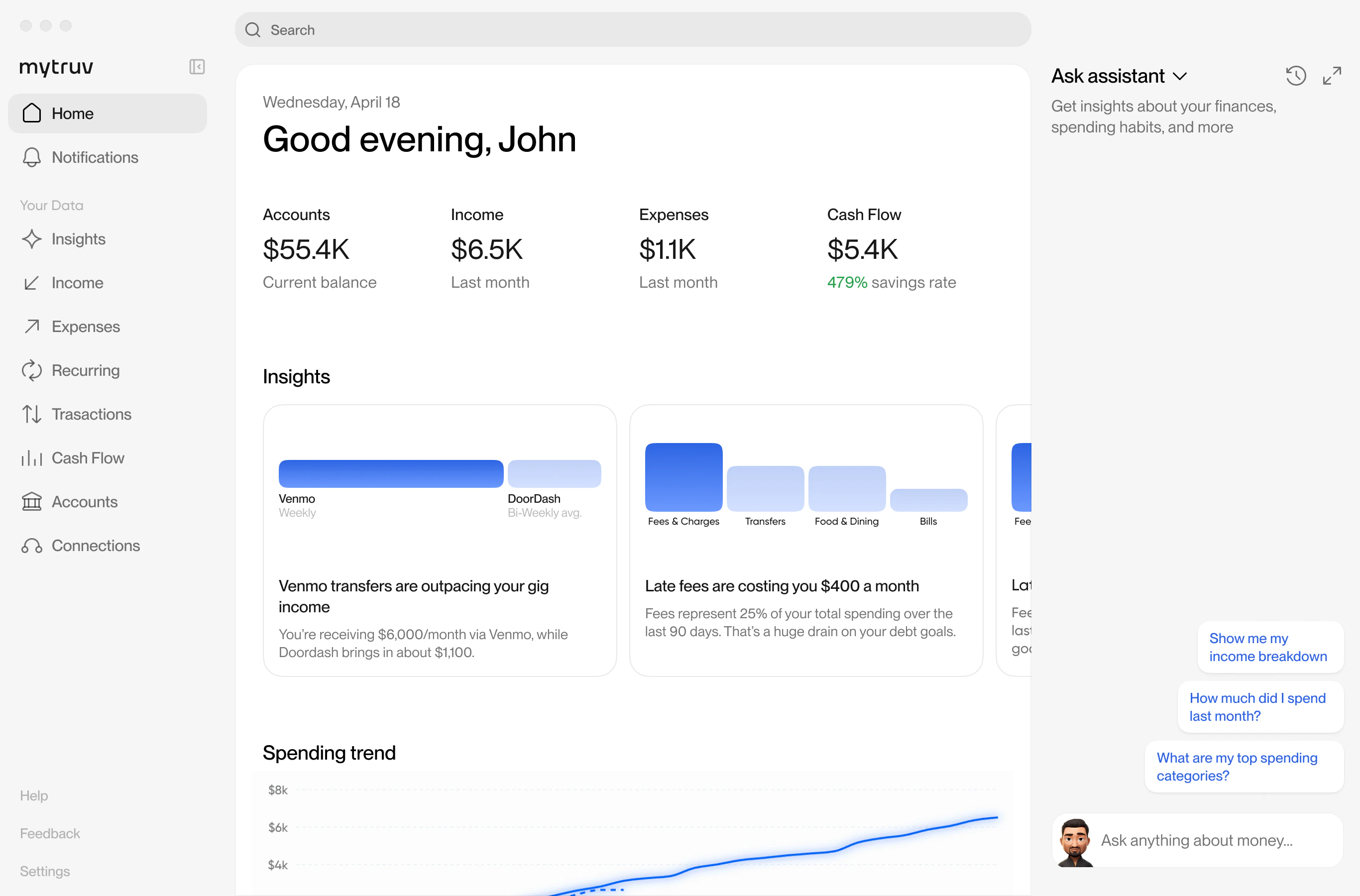
MyTruv is an AI-powered personal finance platform that brings all your financial accounts together in one place. Connect your banks, credit cards, loans, and payroll providers, and then explore your money however you want - through a web app, an iOS app, or directly from the AI tools and code you already use.

<div className="mytruv-cta-row">
  <a className="mytruv-cta mytruv-cta--primary" href="https://app.mytruv.com">Sign up for free</a>
  <a className="mytruv-cta" href="https://apps.apple.com/us/app/mytruv-ai-money-autopilot/id6757509490">Download iOS app</a>
</div>

<Frame>
  <img src="https://mintcdn.com/mytruv-docs/2XJQJIAqGSpjl26O/images/product/command-center.png?fit=max&auto=format&n=2XJQJIAqGSpjl26O&q=85&s=203f1be29029955afa912e935a29bbfd" alt="MyTruv command center dashboard" width="2732" height="1800" data-path="images/product/command-center.png" />
</Frame>

***

## Ways to use MyTruv

<div className="mytruv-card-grid">
  <a className="mytruv-card" href="https://app.mytruv.com">
    <span className="mytruv-card__icon">
      <svg viewBox="0 0 24 24" fill="none" stroke="currentColor" strokeWidth="1.75" strokeLinecap="round" strokeLinejoin="round">
        <path d="M22 12a10 10 0 1 1-20 0 10 10 0 0 1 20 0z" />

        <path d="M2 12h20" />

        <path d="M12 2a15.3 15.3 0 0 1 4 10 15.3 15.3 0 0 1-4 10" />

        <path d="M12 2a15.3 15.3 0 0 0-4 10 15.3 15.3 0 0 0 4 10" />
      </svg>
    </span>

    <h3 className="mytruv-card__title">Web app</h3>
    <p className="mytruv-card__body">app.mytruv.com - the full MyTruv experience in your browser. Connect accounts, chat with the AI assistant, explore transactions, and manage your subscription.</p>

    <span className="mytruv-card__arrow">
      <svg width="16" height="16" viewBox="0 0 24 24" fill="none" stroke="currentColor" strokeWidth="2" strokeLinecap="round" strokeLinejoin="round">
        <path d="M7 17L17 7" />

        <path d="M8 7h9v9" />
      </svg>
    </span>
  </a>

  <a className="mytruv-card" href="https://apps.apple.com/us/app/mytruv-ai-money-autopilot/id6757509490">
    <span className="mytruv-card__icon">
      <svg viewBox="0 0 24 24" fill="currentColor">
        <path d="M17.564 13.056c-.026-2.625 2.143-3.895 2.24-3.953-1.22-1.788-3.12-2.034-3.796-2.062-1.617-.164-3.156.956-3.977.956-.835 0-2.091-.933-3.439-.906-1.77.026-3.402 1.03-4.313 2.616-1.84 3.191-.469 7.908 1.32 10.497.87 1.269 1.907 2.693 3.267 2.642 1.311-.053 1.805-.847 3.39-.847 1.58 0 2.029.847 3.415.82 1.41-.027 2.303-1.295 3.163-2.573 1-1.47 1.411-2.902 1.435-2.977-.031-.013-2.735-1.05-2.761-4.164z" />

        <path d="M14.96 5.395c.73-.882 1.216-2.113.08-3.394-1.008.047-2.223.67-2.973 1.55-.67.774-1.256 2.02-1.099 3.226 1.127.087 2.27-.572 2.992-1.382z" />
      </svg>
    </span>

    <h3 className="mytruv-card__title">iOS app</h3>
    <p className="mytruv-card__body">MyTruv: AI Money Autopilot on the App Store. The same experience on your phone, with Face ID / Touch ID and native iOS notifications.</p>

    <span className="mytruv-card__arrow">
      <svg width="16" height="16" viewBox="0 0 24 24" fill="none" stroke="currentColor" strokeWidth="2" strokeLinecap="round" strokeLinejoin="round">
        <path d="M7 17L17 7" />

        <path d="M8 7h9v9" />
      </svg>
    </span>
  </a>

  <a className="mytruv-card" href="/mytruv-mcp/overview">
    <span className="mytruv-card__icon">
      <svg viewBox="0 0 24 24" fill="none" stroke="currentColor" strokeWidth="1.75" strokeLinecap="round" strokeLinejoin="round">
        <path d="M9 2v6" />

        <path d="M15 2v6" />

        <path d="M6 8h12v4a6 6 0 0 1-12 0z" />

        <path d="M12 18v4" />
      </svg>
    </span>

    <h3 className="mytruv-card__title">MyTruv MCP</h3>
    <p className="mytruv-card__body">Connect MyTruv to Claude, ChatGPT, Gemini, Cursor, or any other MCP-compatible AI assistant. Ask questions about your money in natural language.</p>

    <span className="mytruv-card__arrow">
      <svg width="16" height="16" viewBox="0 0 24 24" fill="none" stroke="currentColor" strokeWidth="2" strokeLinecap="round" strokeLinejoin="round">
        <path d="M7 17L17 7" />

        <path d="M8 7h9v9" />
      </svg>
    </span>
  </a>

  <a className="mytruv-card" href="/mytruv-cli/overview">
    <span className="mytruv-card__icon">
      <svg viewBox="0 0 24 24" fill="none" stroke="currentColor" strokeWidth="1.75" strokeLinecap="round" strokeLinejoin="round">
        <path d="M4 17l6-6-6-6" />

        <path d="M12 19h8" />
      </svg>
    </span>

    <h3 className="mytruv-card__title">MyTruv CLI</h3>
    <p className="mytruv-card__body">Query balances, transactions, income, and spending from the terminal. Ships as a Gemini CLI extension and a local MCP stdio server.</p>

    <span className="mytruv-card__arrow">
      <svg width="16" height="16" viewBox="0 0 24 24" fill="none" stroke="currentColor" strokeWidth="2" strokeLinecap="round" strokeLinejoin="round">
        <path d="M7 17L17 7" />

        <path d="M8 7h9v9" />
      </svg>
    </span>
  </a>

  <a className="mytruv-card" href="/api-reference/overview">
    <span className="mytruv-card__icon">
      <svg viewBox="0 0 24 24" fill="none" stroke="currentColor" strokeWidth="1.75" strokeLinecap="round" strokeLinejoin="round">
        <path d="M16 18l6-6-6-6" />

        <path d="M8 6l-6 6 6 6" />
      </svg>
    </span>

    <h3 className="mytruv-card__title">REST API</h3>
    <p className="mytruv-card__body">Read-only programmatic access for your own integrations, scripts, and dashboards.</p>

    <span className="mytruv-card__arrow">
      <svg width="16" height="16" viewBox="0 0 24 24" fill="none" stroke="currentColor" strokeWidth="2" strokeLinecap="round" strokeLinejoin="round">
        <path d="M7 17L17 7" />

        <path d="M8 7h9v9" />
      </svg>
    </span>
  </a>
</div>

<Info>
  MyTruv is read-only across every surface. It never moves money, changes account settings, or pushes data back to your financial institutions.
</Info>

***

## Create an account

Sign up at [app.mytruv.com](https://app.mytruv.com) or download the iOS app - your account works across every surface listed above. Billing and plan management all live in the web app at [app.mytruv.com/login](https://app.mytruv.com/login).

On Android? There's no native app yet - it's planned for the near future - but the web app is built for mobile, so you get the full experience in any phone browser. Open [app.mytruv.com](https://app.mytruv.com) and add it to your home screen.

***

## Next steps

<div className="mytruv-card-grid">
  <a className="mytruv-card" href="/mytruv-mcp/overview">
    <span className="mytruv-card__icon">
      <svg viewBox="0 0 24 24" fill="none" stroke="currentColor" strokeWidth="1.75" strokeLinecap="round" strokeLinejoin="round">
        <path d="M12 3l1.5 5L18 9l-4.5 1L12 15l-1.5-5L6 9l4.5-1z" />

        <path d="M19 12l.7 2.3L22 15l-2.3.7L19 18l-.7-2.3L16 15l2.3-.7z" />

        <path d="M5 16l.5 1.5L7 18l-1.5.5L5 20l-.5-1.5L3 18l1.5-.5z" />
      </svg>
    </span>

    <h3 className="mytruv-card__title">Connect an AI assistant</h3>
    <p className="mytruv-card__body">Set up MyTruv MCP with your AI tool of choice.</p>

    <span className="mytruv-card__arrow">
      <svg width="16" height="16" viewBox="0 0 24 24" fill="none" stroke="currentColor" strokeWidth="2" strokeLinecap="round" strokeLinejoin="round">
        <path d="M7 17L17 7" />

        <path d="M8 7h9v9" />
      </svg>
    </span>
  </a>

  <a className="mytruv-card" href="/help">
    <span className="mytruv-card__icon">
      <svg viewBox="0 0 24 24" fill="none" stroke="currentColor" strokeWidth="1.75" strokeLinecap="round" strokeLinejoin="round">
        <circle cx="12" cy="12" r="10" />

        <path d="M9.09 9a3 3 0 015.83 1c0 2-3 3-3 3" />

        <path d="M12 17h.01" />
      </svg>
    </span>

    <h3 className="mytruv-card__title">Browse the Help Center</h3>
    <p className="mytruv-card__body">Answers to common questions about using MyTruv day to day.</p>

    <span className="mytruv-card__arrow">
      <svg width="16" height="16" viewBox="0 0 24 24" fill="none" stroke="currentColor" strokeWidth="2" strokeLinecap="round" strokeLinejoin="round">
        <path d="M7 17L17 7" />

        <path d="M8 7h9v9" />
      </svg>
    </span>
  </a>

  <a className="mytruv-card" href="/how-mytruv-compares">
    <span className="mytruv-card__icon">
      <svg viewBox="0 0 24 24" fill="none" stroke="currentColor" strokeWidth="1.75" strokeLinecap="round" strokeLinejoin="round">
        <path d="M16 3h5v5" />

        <path d="M21 3l-7 7" />

        <path d="M8 21H3v-5" />

        <path d="M3 21l7-7" />
      </svg>
    </span>

    <h3 className="mytruv-card__title">How MyTruv compares</h3>
    <p className="mytruv-card__body">Already using another money app? See what's different about MyTruv.</p>

    <span className="mytruv-card__arrow">
      <svg width="16" height="16" viewBox="0 0 24 24" fill="none" stroke="currentColor" strokeWidth="2" strokeLinecap="round" strokeLinejoin="round">
        <path d="M7 17L17 7" />

        <path d="M8 7h9v9" />
      </svg>
    </span>
  </a>
</div>
