> ## Documentation Index
> Fetch the complete documentation index at: https://help.mytruv.com/llms.txt
> Use this file to discover all available pages before exploring further.

# Claude.ai

> Connect MyTruv MCP to Claude.ai and Claude Desktop.

Claude Desktop and Claude.ai connect to MyTruv MCP through Connectors. One-time setup - OAuth handles the sign-in.

<Warning>
  MyTruv MCP is only available on the Pro plan. [Upgrade to Pro](/billing/subscription-plans) to get started.
</Warning>

***

## Server URL

```
https://api.mytruv.com/mcp
```

***

## Steps

1. Open Claude Desktop or Claude.ai and go to Settings > Connectors.
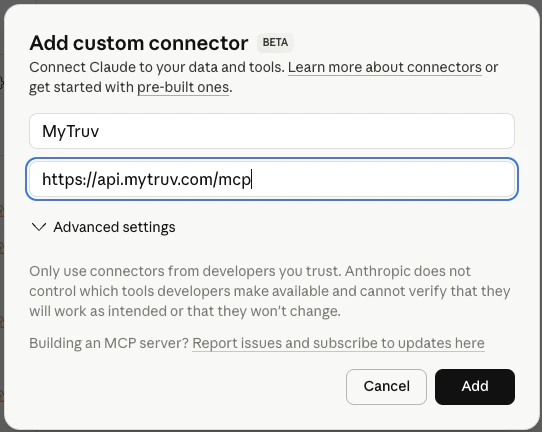
2. Click Add custom connector at the bottom of the list.
3. Set Name to `MyTruv` and paste the server URL above into Remote MCP server URL.

<Frame>
  <img src="https://mintcdn.com/mytruv-docs/2XJQJIAqGSpjl26O/images/product/mcp/claude-add-connector.png?fit=max&auto=format&n=2XJQJIAqGSpjl26O&q=85&s=b6d3016149cc9d31cd5f739c34d94636" alt="Claude's Add custom connector dialog with Name set to MyTruv and the MCP server URL filled in" width="542" height="432" data-path="images/product/mcp/claude-add-connector.png" />
</Frame>

4. Click Add. A browser window opens so you can sign in with your MyTruv account and authorize access.
5. Once authorized, start a new chat and ask Claude to check your balances or pull recent transactions.

***

## Next steps
<div className="mytruv-card-grid">
  <a className="mytruv-card" href="/mytruv-mcp/prompts">
    <span className="mytruv-card__icon">
      <svg viewBox="0 0 24 24" fill="none" stroke="currentColor" strokeWidth="1.75" strokeLinecap="round" strokeLinejoin="round">
        <path d="M12 3l1.5 5L18 9l-4.5 1L12 15l-1.5-5L6 9l4.5-1z" />

        <path d="M19 12l.7 2.3L22 15l-2.3.7L19 18l-.7-2.3L16 15l2.3-.7z" />

        <path d="M5 16l.5 1.5L7 18l-1.5.5L5 20l-.5-1.5L3 18l1.5-.5z" />
      </svg>
    </span>

    <h3 className="mytruv-card__title">Try these prompts</h3>
    <p className="mytruv-card__body">Ready-to-use prompts for your first chats with MyTruv.</p>

    <span className="mytruv-card__arrow">
      <svg width="16" height="16" viewBox="0 0 24 24" fill="none" stroke="currentColor" strokeWidth="2" strokeLinecap="round" strokeLinejoin="round">
        <path d="M7 17L17 7" />

        <path d="M8 7h9v9" />
      </svg>
    </span>
  </a>

  <a className="mytruv-card" href="/mytruv-mcp/tools">
    <span className="mytruv-card__icon">
      <svg viewBox="0 0 24 24" fill="none" stroke="currentColor" strokeWidth="1.75" strokeLinecap="round" strokeLinejoin="round">
        <path d="M14.7 6.3a1 1 0 000 1.4l1.6 1.6a1 1 0 001.4 0l3.77-3.77a6 6 0 01-7.94 7.94l-6.91 6.91a2.12 2.12 0 01-3-3l6.91-6.91a6 6 0 017.94-7.94l-3.76 3.76z" />
      </svg>
    </span>

    <h3 className="mytruv-card__title">Available tools</h3>
    <p className="mytruv-card__body">What Claude can query on your behalf.</p>

    <span className="mytruv-card__arrow">
      <svg width="16" height="16" viewBox="0 0 24 24" fill="none" stroke="currentColor" strokeWidth="2" strokeLinecap="round" strokeLinejoin="round">
        <path d="M7 17L17 7" />

        <path d="M8 7h9v9" />
      </svg>
    </span>
  </a>
</div>
