> ## Documentation Index
> Fetch the complete documentation index at: https://help.mytruv.com/llms.txt
> Use this file to discover all available pages before exploring further.

# MCP for AI Chats

> Connect your MyTruv financial data to Claude, ChatGPT, and other chat assistants.

## What is MCP for AI Chats?

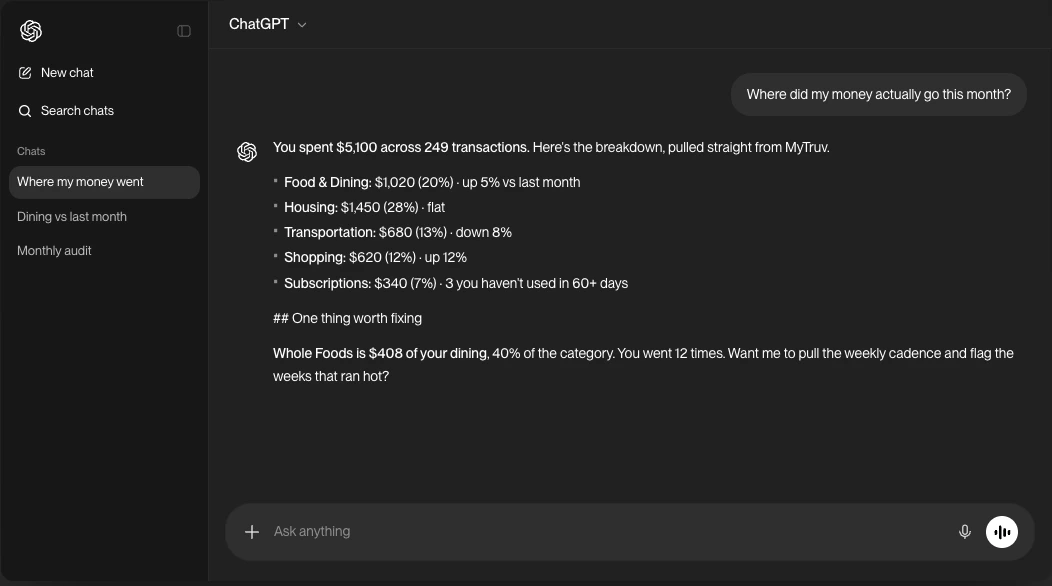
MyTruv MCP plugs your financial data into the AI chat apps you already use - ask Claude or ChatGPT about your spending, balances, paychecks, and subscriptions in plain English and get answers grounded in your real accounts.

<Frame>
  <img src="https://mintcdn.com/mytruv-docs/2XJQJIAqGSpjl26O/images/product/mcp/chatgpt-chat.png?fit=max&auto=format&n=2XJQJIAqGSpjl26O&q=85&s=e768d3f9b47059fbf5af0ed3d9905f04" alt="ChatGPT answering 'Where did my money actually go this month?' with a MyTruv-sourced spending breakdown" width="1052" height="586" data-path="images/product/mcp/chatgpt-chat.png" />
</Frame>

<Info>
  The MCP server is read-only. It cannot modify your accounts, create transactions, or change any settings.
</Info>

<Tip>
  Already signed in to MyTruv? Find this and the other AI integration links anytime from **Settings > AI Integrations** in the web app.
</Tip>

***

## Prerequisites

* A MyTruv Pro subscription (monthly or annual) with at least one connected bank or payroll account
* A chat assistant that supports custom MCP connectors (Claude.ai, Claude Desktop, ChatGPT Plus/Pro/Business/Enterprise/Edu)

<Warning>
  MyTruv MCP is only available on the Pro plan. [Upgrade to Pro](/billing/subscription-plans) to get started.
</Warning>

***

## How authentication works

The MyTruv MCP server uses OAuth. No API keys or tokens to manage - just sign in with your MyTruv account when prompted.

On first use, your browser opens automatically so you can authorize access. After that, your session stays active until you sign out.

The server URL is:

```
https://api.mytruv.com/mcp
```

***

## Pick your chat app

<div className="mytruv-card-grid">
  <a className="mytruv-card" href="/mytruv-mcp/setup/claude">
    <span className="mytruv-card__icon">
      <img src="https://mintcdn.com/mytruv-docs/2XJQJIAqGSpjl26O/images/logos/claude.svg?fit=max&auto=format&n=2XJQJIAqGSpjl26O&q=85&s=a1e797148cba23233e3a9679e2a92f81" alt="" width="16" height="16" data-path="images/logos/claude.svg" />
    </span>

    <h3 className="mytruv-card__title">Claude.ai</h3>
    <p className="mytruv-card__body">Claude.ai and Claude Desktop via Connectors</p>

    <span className="mytruv-card__arrow">
      <svg width="16" height="16" viewBox="0 0 24 24" fill="none" stroke="currentColor" strokeWidth="2" strokeLinecap="round" strokeLinejoin="round">
        <path d="M7 17L17 7" />

        <path d="M8 7h9v9" />
      </svg>
    </span>
  </a>

  <a className="mytruv-card" href="/mytruv-mcp/setup/chatgpt">
    <span className="mytruv-card__icon">
      <img src="https://mintcdn.com/mytruv-docs/2XJQJIAqGSpjl26O/images/logos/chatgpt.svg?fit=max&auto=format&n=2XJQJIAqGSpjl26O&q=85&s=f955df76e5aac8bd37a7ee4d7bd16d16" alt="" width="16" height="16" data-path="images/logos/chatgpt.svg" />
    </span>

    <h3 className="mytruv-card__title">ChatGPT</h3>
    <p className="mytruv-card__body">Custom connector in ChatGPT Settings</p>

    <span className="mytruv-card__arrow">
      <svg width="16" height="16" viewBox="0 0 24 24" fill="none" stroke="currentColor" strokeWidth="2" strokeLinecap="round" strokeLinejoin="round">
        <path d="M7 17L17 7" />

        <path d="M8 7h9v9" />
      </svg>
    </span>
  </a>
</div>

Using Claude Code, Codex, Cursor, or another agentic developer tool? See [MCP for AI Agents](/mytruv-mcp/agents-overview).

***

## Try it out

Once your chat app is connected, the fastest way to see MCP in action is to copy a prompt:

<div className="mytruv-card-grid">
  <a className="mytruv-card" href="/mytruv-mcp/prompts">
    <span className="mytruv-card__icon">
      <svg viewBox="0 0 24 24" fill="none" stroke="currentColor" strokeWidth="1.75" strokeLinecap="round" strokeLinejoin="round">
        <path d="M12 3l1.5 5L18 9l-4.5 1L12 15l-1.5-5L6 9l4.5-1z" />

        <path d="M19 12l.7 2.3L22 15l-2.3.7L19 18l-.7-2.3L16 15l2.3-.7z" />

        <path d="M5 16l.5 1.5L7 18l-1.5.5L5 20l-.5-1.5L3 18l1.5-.5z" />
      </svg>
    </span>

    <h3 className="mytruv-card__title">Try these prompts</h3>
    <p className="mytruv-card__body">Ready-to-use questions to ask Claude or ChatGPT.</p>

    <span className="mytruv-card__arrow">
      <svg width="16" height="16" viewBox="0 0 24 24" fill="none" stroke="currentColor" strokeWidth="2" strokeLinecap="round" strokeLinejoin="round">
        <path d="M7 17L17 7" />

        <path d="M8 7h9v9" />
      </svg>
    </span>
  </a>
</div>

***

## Limitations

* Pro plan required - MyTruv MCP is not available on the free plan
* Read-only access - the MCP server cannot modify your data